Angular 22.2.0 is here!

Angular 22.2 is the second minor release of the v22 cycle,
and it brings two new features: router resource and boundary.
And we can use private properties in templates now 😲.
Let's dive in!
Boundaries
In Angular, if a component throws an error during its rendering or change detection,
then the whole sub-component tree is not rendered,
and you get a partially blank page with an error in the console.
Angular v22.2 introduced a (developer preview) mechanism to catch errors in a component
and display a fallback UI instead of the error: the @boundary syntax.
This is really similar to React's Error Boundaries and is inspired by them.
Let's say we have a Chart component that can throw an error.
Its parent component is Dashboard, which renders the Chart component.
Dashboard can use the @boundary syntax to catch errors thrown by Chart:
<h1>Dashboard</h1>
@boundary {
  <ns-chart />
} @error {
  <div>Oops: {{ $error.message }}</div>
}
This catches the error thrown by Chart
and displays the title "Dashboard" and the fallback UI defined in @error.
In the @error block, we can use the $error variable to display the error message.
The @error block lets you alias the $error variable to a custom name if needed:
<h1>Dashboard</h1>
@boundary {
  <ns-chart />
} @error (let err) {
  <div>Oops: {{ err.message }}</div>
}
You can also define several @error blocks to catch different types of errors,
and distinguish them by using the when condition.
Let's say the Chart component can throw two types of errors: ChartError and DataError.
We can define two @error blocks to catch them,
and a default @error block to catch any other errors:
<h1>Dashboard</h1>
@boundary {
  <ns-chart />
} @error (when isDataError($error)) {
  <div>Data error</div>
} @error (let err; when isChartError(err)) {
  <!-- 👇 You can access custom fields of the error -->
  <div>Chart error ({{ err.chartType }})</div>
} @error {
  <div>Unknown error</div>
}
You can also attempt to recover from an error by using the $reset function.
This function, exposed in each @error block, allows you
to retry the rendering of the component that threw the error:
<h1>Dashboard</h1>
@boundary {
  <ns-chart />
} @error {
  <div>Oops: {{ $error.message }}</div>
  <button (click)="$reset()">Retry</button>
}
This mechanism has also been added to the programmatic API createComponent,
in which you can now specify onError:
viewContainer.createComponent(User, {
  onError: (error: Error, errorDetails: ErrorDetails) => {
    // 👇ErrorDetails contains the boundary component and reset function,
    // and the component/directive class and instance where the error occurred
    console.error('Error while creating', errorDetails.declarationType);
  }
});
You can also define onViewError in your global ErrorHandler
to catch boundary errors.
@boundary is probably a feature that you won't use every day,
but that can be useful in the case of sub-components that can throw errors
and that we don't control (for example, third-party components).
Router
Router resources
Angular has long supported resolvers to load data before activating a route.
In our experience, however, resolvers are not widely used:
they block navigation, and resolvers on parent and child routes run sequentially,
which creates a waterfall and makes navigation feel slow.
They also do not integrate naturally with signals and resource APIs.
Starting with Angular v22.2,
the router provides a new developer preview feature: router resources.
Router resources serve the same purpose as resolvers,
but integrate with signals and resources.
Resources across all matched routes are loaded in parallel,
avoiding parent-child waterfalls when several resources are needed.
This feature is enabled via withRouterResources in the router configuration:
provideRouter(routes, withComponentInputBinding(), withRouterResources());
This lets you define a resource in the route configuration,
which will be automatically set up and loaded during navigation to the route.
{
  path: 'races',
  component: Races,
  // 👇context contains params, queryParams, etc as signals
  resources: context => {
    const page = computed(() => context.queryParams()['page']);
    const races = httpResource<Array<RaceModel>>(() => `/api/races?page=${page()}`);
    // return a key/value object
    // - the key is the name of the data
    // - the value is the resource
    return { races };
  }
}
The intermediate computed signal is important:
it changes only when the page query parameter changes.
If the resource read context.queryParams() directly,
it would reload whenever any query parameter changes,
even if that parameter is unrelated to the request.
This is a "blocking" resource, which will block the navigation until it is loaded.
On the component side, you can access the resource via the ActivatedRoute.resources property,
or even better via an input if you use withComponentInputBinding:
export class Races {
  protected readonly races = input.required<Array<RaceModel>>();
If a navigation is made to the same route with different parameters,
the resource will be reloaded automatically.
While the navigation is pending, the router resource is "frozen":
it continues to expose its previous snapshot until the navigation is complete.
The browser URL is also only updated after a successful navigation.
If an error occurs during the loading of the resource,
the navigation will be canceled and the router will emit a NavigationError.
This can be handled like any other navigation error,
for example via the withNavigationErrorHandler option in the router configuration.
When the underlying resource is resolved, the navigation is completed
and the router resource is "unfrozen",
exposing its new value to the component.
Another way to use resources is to define a "non-blocking" resource,
which will not block the navigation.
To define a non-blocking resource, you can use the nonBlocking helper function:
{
  path: 'races',
  component: Races,
  resources: context => {
    const page = computed(() => context.queryParams()['page']);
    // 👇declare a non-blocking resource with nonBlocking()
    const races = nonBlocking(httpResource<Array<RaceModel>>(() => `/api/races?page=${page()}`));
    return { races };
  }
}
On the component side, you use the resource directly
(rather than its value, as in the blocking example).
You can define an input for the resource,
and use it in the template like any other resource.
export class Races {
  protected readonly races = input.required<Resource<Array<RaceModel> | undefined>>();
During navigation, the resource starts loading alongside the rest of the navigation.
Because the resource does not delay navigation,
the component can be displayed while the resource is still loading.
The browser URL is updated when navigation completes, without waiting for the resource.
At that point, the router resource is "unfrozen".
If the underlying resource is still loading, its value is undefined,
even if a previous value was available before the navigation.
The component must therefore display a loading state instead of the previous value.
When the underlying resource is resolved,
the resource exposes the new value.
To summarize, router resources are a new way to load data before or during a navigation.
Unlike resolvers, they let you decide whether the navigation should be blocked or not
while the data is being loaded.
If you pick a blocking resource, then the component never sees the resource in a loading state
and the navigation is only completed when the resource is loaded.
With a non-blocking resource, the component receives the resource,
and can display a loading state while the resource is being loaded,
or an error state if the resource fails to load.
Throwing RedirectCommand
Angular v18 introduced the RedirectCommand class,
as explained in our blog post.
A small change in v22.2 is that the RedirectCommand can now be thrown
as an error from a guard, a resolver or a resource,
and will be handled by the router.
{
  path: 'users',
  component: UsersComponent,
  canActivate: [
    () => {
      const userService = inject(UserService);
      if (userService.isLoggedIn()) {
        return true;
      }
      // 👇
      throw new RedirectCommand(router.parseUrl('/login'));
    }
  ]
}
FYI, this is really similar to what routers in other frameworks do.
In SvelteKit and Next.js, for example, the redirect() functions
throw an error to stop the current navigation and redirect to another route.
Auto cleanup injectors
The experimental withExperimentalAutoCleanupInjectors introduced in v21.1
(check out our blog post for more details)
has been stabilized in v22.2 and is now named withAutoCleanupInjectors.
Signal forms
A tiny novelty is that hidden() can now be called without a when condition
if the field needs to be permanently hidden.
It was already possible for the readonly() and disabled() functions
to be called without a when condition.
Testing directives
Testing a directive used to require a host component just to attach it to an element.
Angular v22.2 adds TestBed.createDirective() to do this directly.
It returns a DirectiveFixture with access to the directive instance and its host element:
const fixture = TestBed.createDirective(Highlight, {
  tagName: 'div',
  bindings: [inputBinding('highlighted', () => true)]
});
The tagName option is needed here when the directive selector doesn't specify an element.
If the selector includes an element name, Angular can infer it.
Reading injector from view queries
View queries could already read ElementRef, TemplateRef and ViewContainerRef from the matched node,
and now they can also read the Injector.
protected readonly injector = viewChild('ref', { read: Injector });
This can be useful if you want to retrieve a service from the injector of a child component or directive
(for example because it is provided in the providers of that component/directive),
but that's probably a very rare use-case.
Private members in templates
Until now, a component member used in its template had to be public or protected,
even if it was only meant to be accessed from the template.
Starting with v22.2, a component's private members can also be accessed from its template:
export class User {
  private readonly name = signal('Cédric');
}
<p>Hello {{ name() }}</p>
This only applies to the component's own members.
The template still can't access a private member of another object.
This is very surprising if you've been using Angular,
as for the past 10 years (yeah Angular is 10 years old now!)
the template could only access public and protected members of the component.
The official style guide even recommends to make all members used in the template protected.
But this was inconvenient for projects using TypeScript's
isolatedDeclarations option:
public and protected members need explicit type annotations,
whereas the type of private members can still be inferred because they are not part of the public API.
As this option can be enabled to have faster builds (but sadly not supported in the CLI yet),
it was a pain to have to add type annotations to all public/protected members used in templates:
switching the visibility to private was a simple way to avoid this.
Style property binding warning
In development, we have a new runtime warning if a style binding is incorrect.
For example, if a template uses [style.width]="true", you get the following warning in your browser console:
NG0318: `[style.width]` was bound to an invalid value.
Expected a string, number, SafeValue, null, or undefined, but received `boolean` (`true`).
Find more at https://angular.dev/errors/NG0318
Extended diagnostics
Weirdly enough, the compiler didn't warn when an event binding used in a template had a typo in the event name,
and the event was not emitted by any directive applied to the element.
For example, the following template compiles perfectly fine,
but the event name is misspelled (userSelcted instead of userSelected):
<app-user (userSelcted)="onUserSelected()"></app-user>
A new strictUnclaimedEventNames diagnostic flag has been added to the compiler to help catch this kind of error.
When enabled, it will warn if an event binding is used in a template
but the event is not emitted by any directive applied to the element,
and it isn't a known native DOM event.
This only applies to camelCase event names, as dash-separated event names (e.g. my-event) are exempt from this check.
With the flag enabled, the previous template will now produce the following error:
✘ [ERROR] NG8030: Event 'userSelcted' is not emitted by any directive applied to 'app-user'
and it isn't a known native DOM event.
1. If 'userSelcted' is an output of a directive,
make sure the directive is applied to the element and check the output's name for typos.
2. If you're listening to a custom event dispatched by a descendant element,
dash-separated event names (e.g. 'my-event') are exempt from this check.
3. To disable this check entirely, set 'strictUnclaimedEventNames' to false or remove it from the compiler options.
Devtools
The signal part of the Devtools now has a Watch signal button
allowing users to "watch" changes to the associated signal.
The value changes are then logged in the browser console as [DevTools signal watch]: value,
every time the signal updates.
You can also now place a breakpoint on a signal (in Chrome only) directly from the Devtools.
While testing this, I realized that the signal graph can be pretty hard to read in a component
that uses Signal Forms, as the form APIs themselves contain a lot of signals.
We can hope that the Devtools will improve and make things more readable in the future.
Another very interesting addition is the Change Detection analyzer data.
It is an experimental feature that you have to enable in the settings:
when enabled, it displays the change detection data collected next to each component
in the component tree, with the number of change-detection runs and the time the latest one took in ms:
app-root x16 1ms
  app-menu x1 1.2ms
  app-users x2 0.4ms
  ...
The data refreshes automatically when you interact with the application,
making it easy to see which component refreshes too often or too slowly!
The timing is shown with a red background if it exceeds 16.6ms
(meaning the browser may no longer be at 60fps).
This is similar to what the popular React Scan tool does.
It's really nice to have this built into the Devtools now!
Angular CLI performance
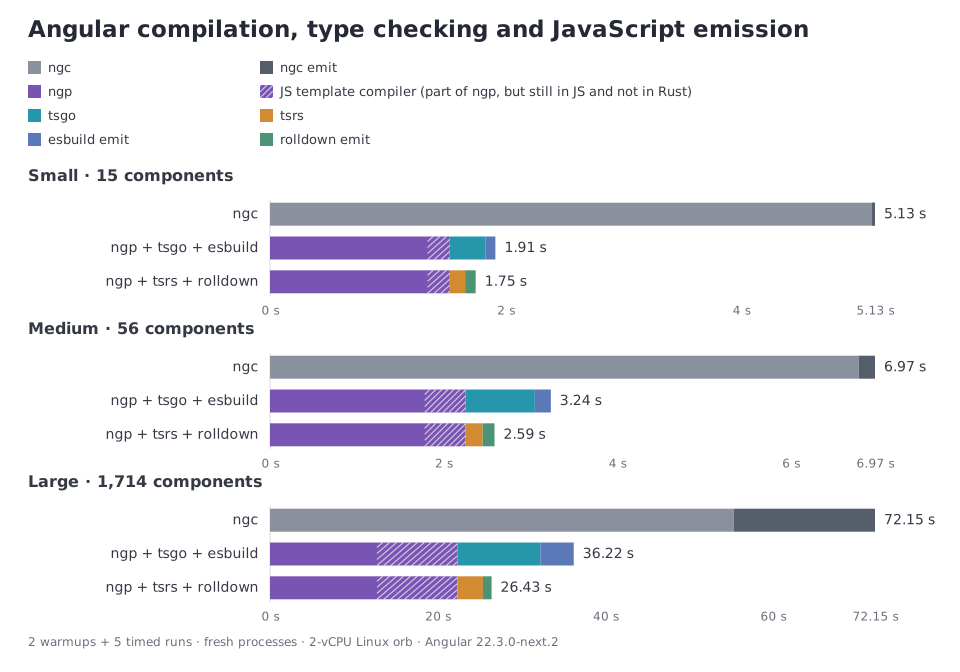
The CLI team has been refactoring the internals of the compilation/build pipeline,
and type-checking no longer blocks the start of esbuild bundling.
The pipeline used to wait for the type-checking result from TS
before starting to generate the JS bundles with esbuild,
whereas it now does both in parallel.
The total time is now closer to the time of the slowest of the tasks,
which is TS by a wide margin 😅.
We should see faster builds, startup and page refreshes when using the dev server:
in a large project where I tested this,
the full build time went from 56s to 48s.
The performance gains exist but are slightly less visible for ng serve,
as the bundling in development is faster than in production.
Bundle stats
The CLI can generate a stats.json file when building your application,
which can be used to analyze the bundle size and composition,
using ng build --stats-json.
The resulting file can then be analyzed with various tools,
like esbuild-visualizer.
In v22.2, the CLI now generates two files: one for your browser build (browser-stats.json)
and one for your server build (server-stats.json), if your application has SSR, of course.
This makes it easier to analyze the bundle size of each build separately:
v22.1
└── stats.json              # browser and server mixed together

v22.2
├── browser-stats.json      # browser JS, CSS and assets
└── server-stats.json       # server .mjs bundles
Vitest v5
The CLI now uses Vitest v5
and generates a config called vitest-base.config.mts instead of vitest-base.config.ts
(to ensure Node.js treats it as ESM).
Vitest v5 brings some performance improvements
and also some breaking changes:
check the Vitest v5 migration guide if you want to upgrade your project.
AI
Slow release on the AI front, but still two things to mention.
MCP
The Angular CLI MCP gained a new --root option
to define which root directory the MCP can access.
By default, the root directory is the project itself,
but you can add other directories (--root can be specified multiple times),
which can be useful in monorepos.
WebMCP
The WebMCP API introduced as an experiment in v22
now allows you to define annotations in a tool declaration:
export class Users {
  constructor() {
    declareExperimentalWebMcpTool({
      name: 'list_users',
      description: 'List users with a specific status',
      // 👇
      annotations: {
        readOnlyHint: true, // the tool is read-only
        untrustedContentHint: false, // the tool returns trusted content
        consequentialHint: false // the tool does not trigger a high-stakes action
      }
    });
  }
}
In the experimentalWebMcpTool option of a form,
readOnlyHint and untrustedContentHint are automatically set to false
(as forms are considered to be read-write and return trusted content)
and can't be overridden.
You should set consequentialHint to true when submitting the form triggers a high-stakes action,
such as making a purchase, sending an email, or booking travel.
This allows the agent or browser to require explicit user confirmation before executing the tool.
Summary
That's all for this release.
The main features are the new @boundary syntax to catch errors in a component,
and the new router resources to load data before or during a navigation,
both in developer preview.
The next release will be v22.3 in November.
Stay tuned!
All our materials (ebook, online training and training) are up-to-date with these changes if you want to learn more!